Blog
WLED Controllers: How to Choose the Right One

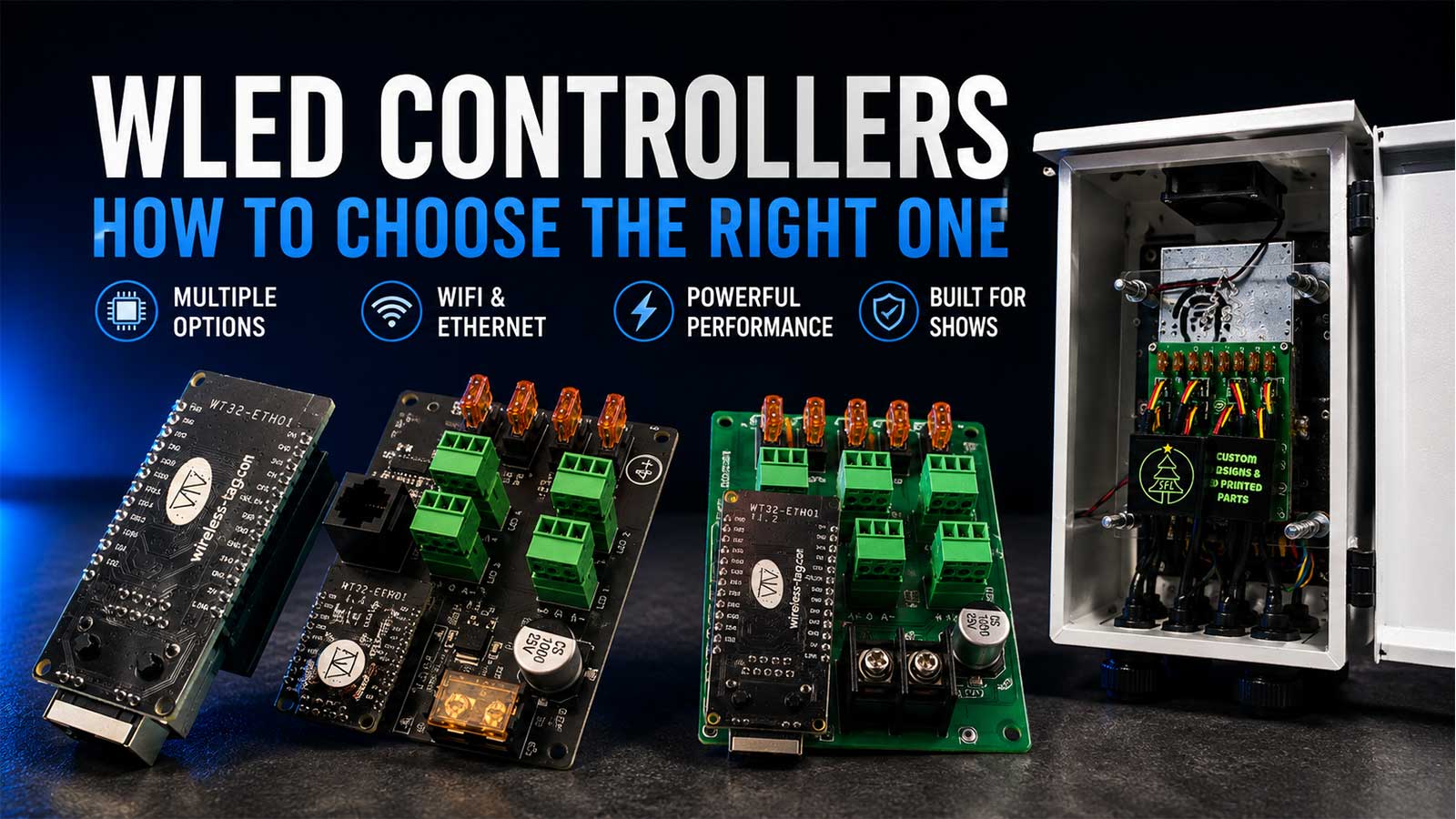
WLED controllers are small ESP32 boards that run free WLED firmware and drive addressable pixels like WS2811, WS2812B, and WS2814. You run them from a browser on your phone, and they can also take live show data from xLights or FPP. What you’re buying varies more than the price tag suggests. Some WLED controllers are bare boards you flash and wire yourself. Others arrive with the firmware loaded, a power supply inside, and an enclosure that survives December. This page sorts out which one your display needs.
What Is a WLED Controller?
A WLED controller is an ESP32 board running WLED, free open source firmware that drives addressable LED pixels over Wi-Fi or Ethernet. You set colors, effects, and presets from a web browser on your phone. The same board can also receive E1.31 or DDP show data from xLights or Falcon Player, so it works inside a sequenced display.
One clarification before you shop. WLED here means the firmware project, not the white LED backlight behind a TV or phone screen. Same four letters, unrelated hardware.
The firmware itself costs nothing. It’s released under the MIT License, written originally by Christian Schwinne, and now maintained by a team. It drives the chipsets you’re already running: WS2812B, WS2811, SK6812, and SPI parts like APA102, plus HUB75 panels.
So the firmware is free. The board it runs on is what you pay for.
WLED Controllers at a Glance
All four of these ship from Your Pixel Store with WLED already installed on an ESP32 based WT32-ETH01 board, and all four have both Wi-Fi and Ethernet built in.
| Controller | Ports | Max pixels per port | Connectivity | Enclosure and power supply | Best fit | Price |
|---|---|---|---|---|---|---|
| Advanced Duo Controller 12v | 2 | Not published | Wi-Fi and Ethernet | Board only, fused power distribution, breakout header for sensors, buttons, relays, and audio | One or two props, a house outline, permanent landscape lights | $35.00 |
| Quad+ Controller 12v | 4 onboard, plus 4 differential outputs | 400 at 40 FPS, 800 at 20 FPS | Wi-Fi and Ethernet | Board only, built-in power distribution | A mid-size yard with props up to 300 feet out on a differential receiver | $48.00 |
| Advanced 8-Port Ethernet Controller 12v | 8 | 500 at 40 FPS (tested to 600), 800 at 20 FPS | Wi-Fi and Ethernet | Board only, Phoenix connector power distribution | A full roofline plus props, when you already own a power supply and a box | $55.00 |
| YPS 8-Port Controller, Ready 2 Run with Enclosure 12v | 8 | 500 at 40 FPS (tested to 600), 800 at 20 FPS | Wi-Fi and Ethernet | Meanwell 350W 12V supply and YPS Small Metal Enclosure included | Same display, but you want it wired, boxed, and outdoor ready on arrival | $265.00 (was $300.00) |
All four are 12V. Per-port numbers are per port. They don’t multiply into a board total without a frame rate penalty, which is the next section’s job to explain.
Firmware, Board, or Finished Controller: What You Actually Buy
People use “WLED controller” for three different things, and the confusion costs builders a weekend every season.
The firmware is WLED itself. Free, open source, and it runs on hardware you supply.
The board is an ESP32 with WLED flashed onto it. This is what most marketplace listings sell. A bare ESP32 also needs a level shifter to talk to your pixels. The WLED project calls this mandatory, especially with 12V or 24V strips. Skip it and your data line works on the bench and gets flaky at 50 feet.
The finished controller is a board with power input, output ports, power distribution, a level shifter, and usually an enclosure and a power supply. You mount it, wire your strings, and go.
Two builders can pay similar money and get very different evenings. One buys a cheap board, then adds a level shifting HAT, Phoenix connectors, a project box, and a power supply, and spends a night with a soldering iron. The other buys a finished build and spends that night hanging pixels. Same firmware, different purchase. Price the missing parts before you compare the boards.
All four Your Pixel Store boards above ship with WLED already on them and a custom HAT that shifts the 3.3V ESP32 signal up to the 5V your pixels expect. Three of the four are still boards, not finished controllers. Only the Ready 2 Run build includes the power supply and the enclosure.
Third-Party WLED Boards: Athom, QuinLED, and Generic ESP32
You’ll see three other names while you shop, and they’re worth knowing.
QuinLED (the Dig-Uno and Dig-Quad boards) is the reference point for WLED hardware. Quindor’s testing on pixel counts and frame rates is the most careful public work on the subject, and we cite it below. Third-party WLED controllers generally run $25 to $70.
Athom sells enclosed all-in-one WLED boxes aimed at Home Assistant users. They’re built for indoor smart home use. Community reports on reliability are mixed enough that the WLED forum carries a thread arguing against them by name. Read the current threads before you commit a show to one.
Generic ESP32 boards off a marketplace are the cheapest entry and the most work. No level shifter, no power distribution, no enclosure, no fuse. For a strip behind a TV, fine. For 800 pixels on a roofline in freezing rain, you’re building the rest of the controller yourself.
What you trade away is mostly outdoor readiness and someone to call in December. What you gain is a lower price and, with QuinLED, good documentation.
How to Choose a WLED Controller
Apply these in order. The first two eliminate most of the catalog.
- Ready to run, or a board you finish? If you own a 12V supply and an enclosure, buy the board. If you don’t, price a supply and a weatherproof box into the comparison before you decide anything is cheap.
- How many separate runs do you have? Count props, not pixels. A roofline, two mega tree sections, and four mini trees is seven runs, so a 2-port board won’t do it no matter how few pixels you’re running.
- How many pixels on the longest run? At 40 FPS, our 8-port boards are rated to 500 pixels per port and tested to 600. The Quad+ is rated to 400 per port at 40 FPS. Drop to 20 FPS and both go to 800.
- 5V or 12V pixels? Match the controller to the pixels you own. All four boards here are 12V.
- Wi-Fi or Ethernet? For a six-week unattended show, run Ethernet. Every board here has both, so this is a wiring decision, not a purchase decision.
- Outdoors or under cover? An enclosure and a cable gland aren’t optional in a yard. Budget for them or buy the build that includes them.
- Sequenced show now, or later? WLED boards receive E1.31 and DDP, so a standalone prop today can join an xLights show next season without new hardware.
Current draw sets a ceiling too. Each port on these boards handles up to 5 amps. A WS2812B pixel is rated around 60mA at full white, which is a worst-case rule of thumb rather than a per-channel datasheet figure. Real sequences rarely hold full white, but size your supply against the worst case, not the average.
How Many Pixels Can One WLED Controller Run?
The published numbers disagree, and the disagreement is the useful part.
- Retail storefronts commonly cap a WLED board at 800 pixels and 15 amps across two data ports.
- Over E1.31, WLED supports 170 LEDs per universe across up to nine adjacent universes, against a 1,500 LED maximum over E1.31.
- The project’s own multi-strip page runs higher. It lists 512 LEDs per pin across 4 outputs, 2,048 total, for perfect performance, and 800 per pin across 4 outputs, 3,200 total, for very good performance.
- QuinLED’s measurements are the most conservative and the most useful for show builders. An ESP32 calculates roughly 65,000 to 85,000 LEDs per second, which works out to 1,000 LEDs at about 70 FPS, 2,000 at about 35 FPS, and 4,000 at about 18 FPS. Quindor recommends 500 to 600 LEDs per channel as a working maximum to hold frame rate.
Every one of those numbers is true under its own assumptions. The variable nobody puts on the box is frame rate.
This is where the spec sheets mislead. An 8-port board rated at 500 pixels per port does not run 4,000 pixels at 40 FPS. The per-port rating protects the data line on that port. The total is bounded by how fast the ESP32 can calculate the whole frame, which is where QuinLED’s LEDs-per-second math takes over. Load 4,000 pixels on one board and you’re looking at something closer to 18 FPS, and a sequence built at 40 FPS will stutter on fast chases.
Plan around 2,000 to 2,500 pixels per WLED controller for smooth sequenced work. Spread the rest across more boards, or move up to a show controller. A roofline of 600 pixels, a 1,200-pixel mega tree, and a few small props is a comfortable single-board load. A 4,000-pixel matrix is not.
Wi-Fi or Ethernet?
Wi-Fi is fine for a prop you run from the app. For a sequenced show, run Ethernet.
The reason isn’t bandwidth, it’s December. A signal that tests at full strength from the driveway in October has more to fight by December. Wet siding, snow on the eave, and a neighborhood full of new devices all cut into it. Sequenced data is a constant stream, and a two-second dropout during a song is visible from the street.
All four boards on this page have Ethernet built in at no extra cost, which is unusual at these prices. Run a Cat6 line to the controller box, and keep Wi-Fi as the backup path for pulling up the WLED interface from your phone in the yard.
5V or 12V?
Match the controller’s output voltage to the pixels you already own. Mismatched voltage is one of the few mistakes in this hobby that destroys parts instead of just annoying you.
WS2812B is a 5V part. WS2811 and WS2815 pixels are the 12V ones, and they’re what most yard displays run. Feed 12V into a 5V pixel string and you’ll smell it. The four controllers here are all 12V.
Voltage also changes your wiring plan. At 12V you can run longer strings before voltage drop dims the far end. Our install guidance is to inject power every 50 pixels at 5V and every 100 pixels at 12V. That’s standard practice rather than a hard rule, since wire gauge and brightness both move the number. For the full comparison, see 5V vs 12V vs 24V pixels. If you’re matching pixels, controller, and supply for an outdoor run, the outdoor pixel compatibility guide covers the combinations that hold up.
Powering and Weatherproofing Your Controller
Size the supply before you buy the board. Take your pixel count, multiply by 60mA for worst-case white, and add headroom. A 500-pixel run at full white pulls around 30 amps at 5V. The same brightness costs far fewer amps at 12V, which is a large part of why yard displays settled on 12V. Each port here is rated to 5 amps, so heavy runs need power injection no matter how big the supply is.
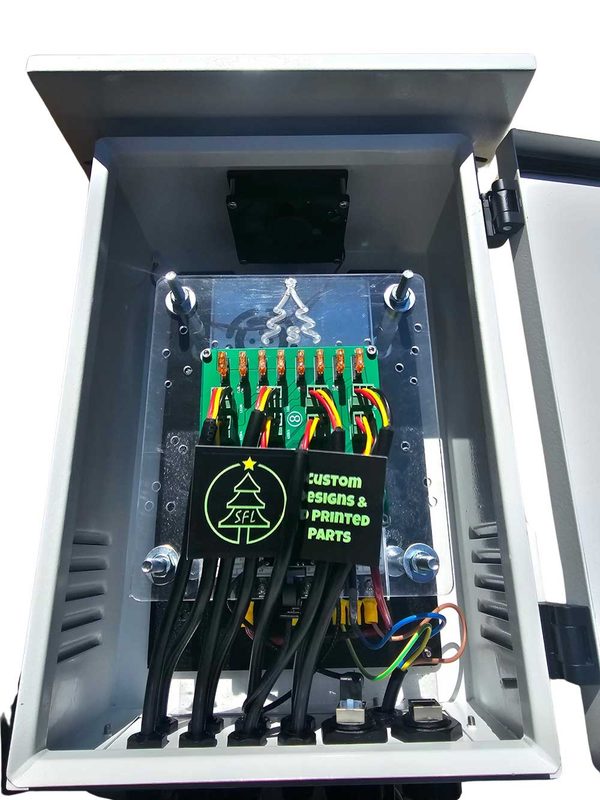
Weatherproofing is where indoor WLED advice stops being useful. Most WLED content assumes a board on a desk. A controller in a yard needs a sealed box, cable glands on every entry, and drainage that assumes water gets in anyway. The Ready 2 Run build ships in a YPS Small Metal Enclosure with the Meanwell 350W supply already mounted. If you’re building your own, budget for the box and the glands when you budget for the board.
None of this is electrical advice for your mains wiring. Bring in an electrician for anything on the house side of the power supply.
Where WLED Fits in an xLights or FPP Show
WLED and xLights aren’t alternatives. A WLED controller acts as a receiver inside a show: xLights or FPP sends live E1.31 or DDP over your network, and the board turns that into pixel data. WLED listens for DDP on port 4048, and DDP’s smaller packet header makes it the better choice for high frame rate sequences. E1.31 carries 170 LEDs per universe. No paid license is involved on either side.
The rest of the year, the same board runs standalone. Effects, presets, and playlists from the WLED app, no show computer running. That dual role is why builders put WLED on permanent house outlines and landscape lighting.
For the setup detail, including how to add the board in xLights, the YPS 8-Port Ready 2 Run product page carries the configuration notes and setup PDF for these boards.
When You Outgrow WLED
At some point WLED stops being the right buy, and we’d rather say so than sell you four boards you’ll replace.
You’ve outgrown WLED controllers when your show runs several thousand pixels at 40 FPS across many props. Same answer when you need more outputs than one board carries without losing frame rate, or when you want smart receivers and long-range runs across a large property. That’s Falcon, Kulp, and VIVID 8 territory.
The boundary is roughly this: one board, a couple thousand pixels, a handful of props, and WLED does the job for a fraction of the price. Past that, you’re fighting the hardware. Our guide to choosing the right xLights controller walks through the full-show options.
Plenty of builders run both. A Falcon drives the main show, and a WLED board handles the porch columns that stay lit all year.
Recommended WLED Controllers from Your Pixel Store
Each of these is a match for a specific display, not a general upgrade path.
Two ports, one or two props, permanent installs. The Advanced Duo Controller 12v at $35.00 has 2 outputs, fused power distribution, and a breakout header for sensors, buttons, relays, and audio inputs. It’s small enough to sit in an eave, which is why it ends up on house outlines and landscape runs that stay up year round.
Four to eight runs with props far from the box. The Quad+ Controller 12v at $48.00 has 4 onboard outputs rated to 400 pixels per port at 40 FPS. It adds 4 differential outputs that reach pixels up to 300 feet away through a differential receiver, including a Falcon, Kulp, or Experience Lights receiver you already own. We don’t know of another WLED-native board with differential output.
A full roofline plus props, when you already have a box and a supply. The Advanced 8-Port Ethernet Controller at $55.00 gives you 8 outputs with Phoenix connector power distribution. It’s rated to 500 pixels per port at 40 FPS and tested to 600.
The same eight ports, ready for the yard. The YPS 8-Port Ready 2 Run with Enclosure at $265.00, down from $300.00, is that same board with a Meanwell 350W 12V supply mounted in a YPS Small Metal Enclosure. Black or white, optional fan. You’re paying for the supply, the box, and the build time. If you’d rather hang pixels than wire a controller, this is the one.
Setup on any of them is short: connect the board to your network, open the WLED interface, tell it how many pixels are on each output, and set the protocol your show software uses. If you’re flashing your own board or want the first-boot detail, our guide on installing WLED from flash to first light covers the whole sequence.
Still sizing the show and not sure how many ports, pixels, and amps you need? Book a one-on-one help session and we’ll work through your prop list with you before you order.
Frequently Asked Questions
Is WLED free, and what does it cost?
The firmware is free and open source under the MIT License, with no paid tier and no license for show use. What you pay for is hardware. Bare third-party boards typically run $25 to $70, and finished controllers with a power supply and an enclosure run higher because those parts are included.
Do I have to flash WLED myself, or can I buy it pre-installed?
Both options exist. Generic ESP32 boards arrive blank and you flash them. Every WLED controller Your Pixel Store sells ships with the firmware installed and a level shifting HAT in place. You connect it to your network and set up your outputs instead of building the board first.
ESP32 or ESP8266, which should I buy?
Buy ESP32. The WLED project states that ESP8266 should not be used for any new installations, and that ESP32-C3, S2, and S3 variants are only experimentally supported. The classic ESP32 handles more outputs and calculates frames faster, which is what protects your frame rate on larger displays.
Which LED chipsets does WLED support, and does it handle RGBW?
WLED drives WS2811, WS2812B, SK6812, and WS2814 pixels, plus SPI chipsets like WS2801 and APA102 and HUB75 panels. RGBW pixels such as SK6812 and WS2814 are supported. Match the chipset and voltage of the pixels you already own before ordering a controller.